> ## Documentation Index
> Fetch the complete documentation index at: https://docs.kairos.trade/llms.txt
> Use this file to discover all available pages before exploring further.
# Copy Trading
> Automatically mirror trades from any trader on Kairos
Copy Trading mirrors another Kairos trader's orders into your account automatically — pick a trader, set an allocation, and Kairos places matching trades whenever they buy or sell. This page covers finding a trader, configuring a subscription, the filters and risk controls that can stop a copy, and how to read the Activity feed when nothing gets copied.
**Note:** Copy Trading supports **Polymarket** and **Predict.fun**. Regional restrictions apply.
## Quickstart
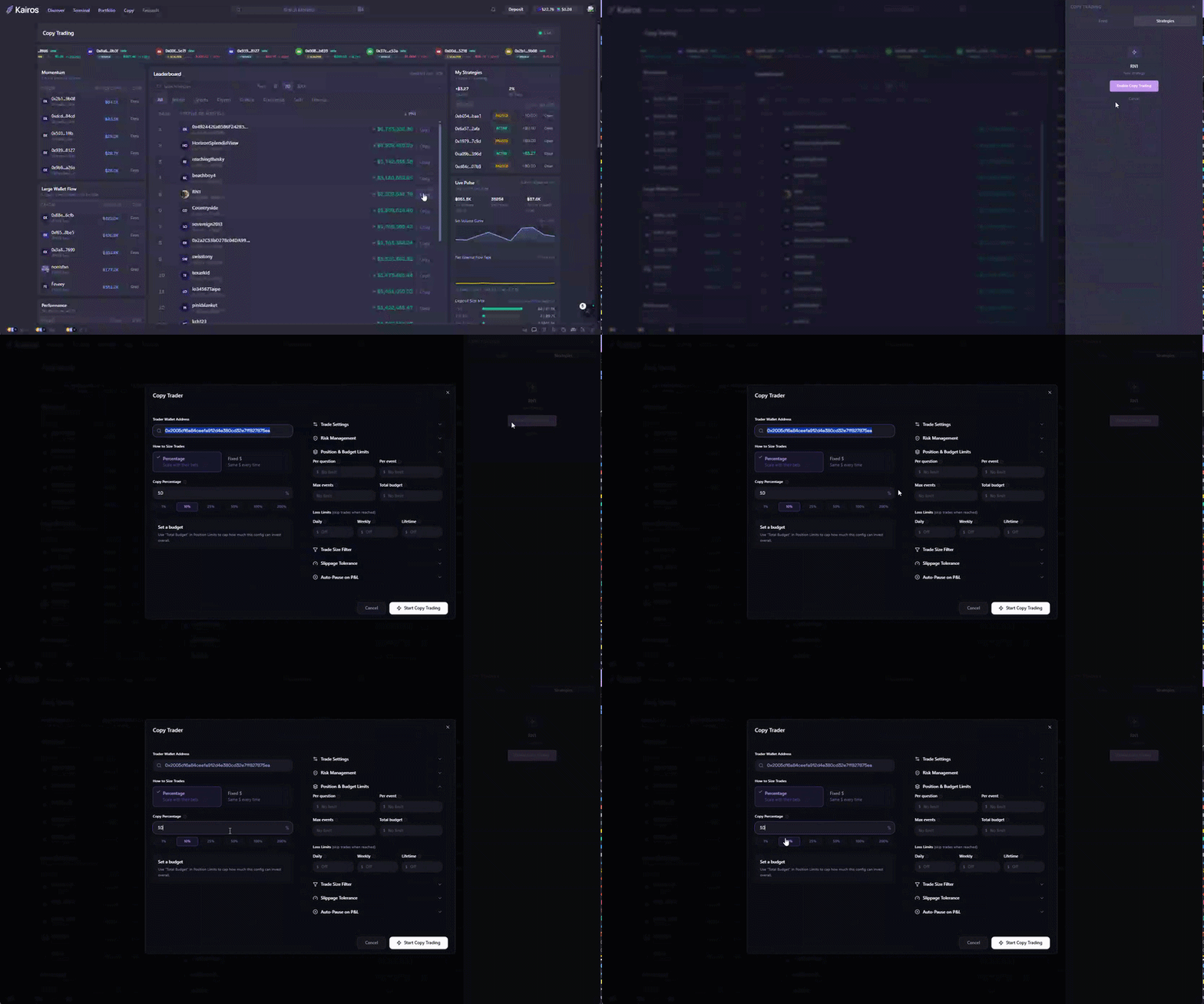
1. Open **`/copytrading`** — the leaderboard loads automatically, ranked by realized PnL.
2. Set the time period to **30d** and pick a trader near the top with a healthy follower count.
3. Open their profile and select **Copy**. The strategy configurator opens.
4. Set **Allocation type: Percentage**, **value: 10%** (or lower), leave everything else at default.
5. Confirm to start copying.
Eligible trades that wallet makes on Polymarket or Predict.fun now mirror into your account at 10% of size. Open **My Strategies** on the Copy Trading page to pause, resume, edit, or stop it.
 ## How It Works
Kairos watches tracked traders on-chain. When a trader you subscribe to trades, Kairos:
1. **Detects** the trade off the live Kairos trade tape (usually within seconds).
2. **Evaluates** it against your allocation, filters, and risk controls.
3. **Copies** it — if all checks pass — by submitting a matching order.
4. **Records** the result on Activity as `PENDING`, `QUEUED`, `EXECUTING`, `EXECUTED`, `FAILED`, or `SKIPPED`.
If the leader exits a position, Kairos exits yours too by default (**Follow Exits**).
### Three detection paths
| Path | What it is | Cadence |
| - | - | - |
| **Live tape** | Continuously watches eligible Polymarket and Predict.fun leader trades. | Continuous |
| **Poller** | A safety net polling the Polymarket Data API for anything the live path missed. | Every 30s |
| **Catch-up** | On service restart, a replay of recent Polymarket trades from the trade warehouse. | On startup |
The live tape's upstream ingest includes a mempool feed, but that is one source
among several and is not how copy trading itself detects a trade — two of the
three paths above read confirmed data.
**Signals older than 30 seconds are dropped before any record is created.** If
a leader trades and *nothing at all* appears on Activity — not even a Skipped
row — that is the staleness cut-off, not a bug. Entries older than 120 seconds
are rejected further downstream.
## Finding a Trader
The leaderboard at **`/copytrading`** is the primary discovery tool.
| Control | Filters by |
| - | - |
| Category | Overall, Politics, Sports, Crypto, Culture, Mentions, Weather, Economics, Tech, Finance |
| Time Period | 5m (live, desktop only), 1d, 7d, 30d |
| Venue | All, Polymarket, Predict.fun |
| Search | Wallet address or username |
The leaderboard ranks by **realized PnL** for the selected period.
Each entry shows a lifetime **win rate** (winning closed positions ÷ total closed positions). It only appears once a trader has at least 10 closed positions with recorded outcomes, and only on venues that report lifetime win/loss counts — Polymarket and Predict.fun. On the **All** board, the count is summed across both venues. Until the threshold is met the field is absent rather than `0`.
**A wallet subscription copies Polymarket and Predict.fun trades.** Orders
execute on the same venue as the leader's trade, using your wallet and balance
on that venue. Your subscription budget and loss limits cover both venues;
per-market limits apply separately to each venue's market.
What to weigh, not just top-line PnL:
* **Consistency** across 1d/7d/30d beats a single hot day.
* **Volume, not just PnL** — $50k profit on $100k volume beats $5k on $50.
* **Verified badge** — confirmed identity and track record (a signal, not a requirement).
* **Other badges** — traders can also carry On Fire, Whale, Sharpshooter, or **Bot**. A Bot badge is worth knowing about before you mirror the flow.
* **Follower count** — a tiebreaker; zero followers on an established trader is unusual.
* **Recent activity** — check the trader's recent trades; a dormant trader generates nothing to copy.
* **PnL chart shape** — a steady slope is safer than a spiky recent pump.
**Past performance doesn't predict future returns** — size your allocation to what you can afford to lose.
## Follow vs. Copy
| Type | Does | Use when |
| - | - | - |
| **Follow** | Adds the trader to your copy sidebar and tracks activity. No capital deployed. | Evaluating a trader first. |
| **Copy** | Actively mirrors trades per your allocation and filters. | Ready to commit capital. |
Upgrading Follow → Copy is atomic — no overlapping subscriptions or gaps.
## Configuring a Subscription
Open the strategy configurator from a trader profile's **Copy** action. The same settings are available later from **My Strategies → Settings**.
### Allocation
The dialog offers two allocation types.
| Type | Range | Example | Best for |
| - | - | - | - |
| **Percentage** (default 10%) | 1–100% | Leader buys $1,000 → 10% → you buy $100 | Matching leader conviction |
| **Fixed USD** | \$1 minimum | Leader buys $1,000 → you buy $50 | Predictable exposure |
**Fixed USD is a ceiling, never an amplifier.** If the leader trades less than
your fixed amount, you copy *their* smaller size — set $50 and a $5 leader
trade copies at $5, not $50. It only binds on trades larger than your figure.
Fixed USD across all your active subscriptions caps at **\$100,000 combined**.
Separately, a per-user **total open exposure cap** applies across copy trading
as a whole.
**100% Percentage only works if your wallet is at least as big as the
leader's.** Otherwise the copy order fails on balance — and an insufficient
balance **auto-pauses every subscription you have**, not just the one that
failed. Use Fixed USD to track a whale instead.
A third `PROPORTIONAL` allocation type exists in the API but is not offered in
the dialog and has different semantics from a share ratio. Treat it as
unsupported.
### Execution Mode
| Mode | Behavior |
| - | - |
| **Market** (default) | Fills immediately at best available price. |
| **Limit** | Fills at the leader's price or better; may not fill at all. |
**Most copy traders should stay on Market** — Limit looks safer but misses fills in fast markets; pair Market with Max Slippage instead.
**Limit mode skips the slippage check entirely.** It uses the leader's signal
price as the limit, so Max Slippage only does anything on Market.
Polymarket market **buys** under **$1.00** are skipped, because the venue rejects
marketable buys below that. Limit orders are exempt. Every copy order, either
mode, must be at least **$0.10**.
### Collateral Mode
`collateral_mode` is an API-level subscription setting, not a toggle in the
Copy Trader dialog. It is stamped onto every follower order the subscription
emits, so it is where you say whether copy orders may check — or move — your
collateral before they reach the venue.
| Mode | Behavior |
| - | - |
| **`skip`** (default) | Today's path. No affordability check, no hold, no funding; the venue is the check. |
| **`check`** | Affordability check plus a hold before submit. Refuses a known shortfall; never moves money. |
| **`fund`** | `check` plus cross-ledger funding within the two caps below. |
`fund` requires **both** caps, and neither is accepted under any other mode:
| Setting | Type | Required | Meaning |
| - | - | - | - |
| `collateral_max_bridge_fee_usdc` | decimal | `fund` only | The most bridge fee a follower order consents to pay, in USDC. Non-negative, at most 8 decimal places, below `10000000000`. `0` means "fund only if it is free" |
| `collateral_max_funding_wait_ms` | integer | `fund` only | The longest a follower order consents to wait for funding. `0`–`600000` (ten minutes) |
The default is `skip`, so an existing subscription is unaffected and a follower
funds nothing they did not opt into. An unrecognised mode is rejected with
`collateral_mode must be one of: skip, check, fund`; `fund` without a cap is
rejected with `collateral_mode 'fund' requires collateral_max_bridge_fee_usdc`
(or `..._max_funding_wait_ms`); a cap under any other mode is rejected with
`collateral_max_bridge_fee_usdc is only valid with collateral_mode 'fund'`.
### Follow Exits and Auto Redemptions
* **Follow Exits** (default on) — closes your copy when the leader sells. Off leaves you to manage exits yourself.
* **Auto Redemptions** (default on) — redeems winning positions to USDC on resolution, swept on an interval. Off leaves them sitting until you redeem manually. This is an API-level setting; it is not a toggle in the Copy Trader dialog.
## Filters
A trade failing any active filter is **Skipped** with a reason on the Activity tab.
| Filter | Behavior |
| - | - |
| **Allowed / Blocked Markets** | Two mutually exclusive lists of market token ids, max 100 entries each; empty = copy everything. |
| **Price Range** | `priceRangeMin` / `priceRangeMax` in **cents, 0–100** — not dollars. `20`–`80` means $0.20–$0.80. |
| **Max Slippage** | A **percentage**, greater than 0 and no more than **50**. Typical values are 1–5 (%). |
| **Max Time to Resolution** | Any (default), 2 days, 7 days, 30 days, or 90 days out. Applies to entries (buys) only. |
> **Max Slippage is not optional in practice.** Leave it blank and a **5%**
> service default applies — there is no "unlimited slippage" setting.
> **Max Time to Resolution fails closed.** If the market's end date cannot be
> resolved, the trade is skipped rather than copied.
Three independent size caps, stackable:
| Cap | Limits |
| - | - |
| **Max Copy Per Trade** | A single copy order (USDC). |
| **Max Position Size** | Total open exposure for **this whole subscription**, across every market — not a per-market figure. Minimum \$1. The dialog labels it *Total Open Exposure*. |
| **Max Per Market** | USDC committed to one market from this subscription. |
**If you only set one, use Max Position Size** — it is the ceiling on everything
this subscription can have at risk at once.
**The position and per-market caps are indistinguishable in Activity.** When
either binds, the skip reason is the same generic *"Allocation capacity
exhausted"*.
## Risk Controls (Advanced)
**Every risk control pauses the subscription. None of them sells, closes, or
liquidates anything.** Tripping a Stop Loss stops *new copies* — your existing
positions stay open and you must flatten them yourself. Every trigger message
begins *"Auto-paused: …"*.
* **Stop Loss** — a percentage loss threshold (0–100); breaching it pauses the subscription.
* **Take Profit** — the same on the upside; hitting it pauses the subscription.
* **Trailing Stop** — a percentage retrace from the subscription's peak PnL high-water mark; breaching it pauses.
* **Loss Limits** — USD caps on cumulative loss, tracked **Daily** (trailing 24h), **Weekly** (trailing 7d), and **Lifetime**. Breaching any pauses.
* **Auto-Pause on PnL** — a **USD** floor, not a percentage: pauses when total PnL falls below it.
* **Max Events** — a trade-count budget ("copy the next 25 trades"); pauses once exhausted.
Two things to understand before relying on these:
> **They are computed from realized PnL only.** There is no mark-price input, so
> unrealized PnL is treated as zero. A position deep underwater but unsold will
> not trip Stop Loss, Take Profit, or Trailing Stop.
> **They are configured through the API, not the Copy Trader dialog.** The
> dialog exposes loss limits and Max Events; Stop Loss, Take Profit, Trailing
> Stop, and Auto-Pause on PnL are subscription fields set via the API.
If the trailing high-water mark cannot be read, the subscription pauses rather
than continuing without the guard.
## Recommended Presets
| Setting | Conservative | Balanced | Whale-tracker |
| - | - | - | - |
| Allocation | Percentage 5% | Percentage 10% | Fixed USD \$100/trade |
| Execution Mode | Market | Market | Market |
| Max Slippage | 2% | 3% | 5% |
| Follow Exits | On | On | On |
| Max Position Size | \$500 | \$2,000 | \$1,000 |
| Other | Weekly loss limit \$200 | Max Copy/Trade \$500 | Max Time to Resolution 30 days |
Start Conservative for your first trader; upgrade once you've seen a full week of activity, including skips and failures.
## My Strategies
Open **My Strategies** from `/copytrading` to manage every subscription. The
page shows status, sizing, PnL, copied trades, fill rate, and recent activity.
Pause and Resume are available directly on each row.
Open a strategy for its detailed views:
* **Overview** — exposure, positions, performance, and recent activity.
* **Trades** — copied orders and their execution or skip reason.
* **Trader Feed** — the source trader's recent activity.
* **Settings** — allocation, execution, filters, and risk controls.
* **Health** — failure and skip rates with reason breakdowns.
Bulk **Pause / Resume / Cancel** accepts up to **20 subscription ids** per
request.
## Subscription Lifecycle
| State | Meaning |
| - | - |
| **Active** | Receiving leader trades and placing copy orders. |
| **Paused** | No new copies; existing positions stay open. |
| **Cancelled** | Permanent — cannot be reactivated; create a new subscription. |
> **Pausing or cancelling never exits existing positions** — it only stops new
> copies. Flatten manually from Portfolio.
> **Cancelling does cancel your resting copy orders**, so no further fills
> arrive from orders already on the book. **Pausing does not** — a resting copy
> order placed before you paused can still fill.
You can hold at most **one active subscription per trader**.
## Skip Reasons
**Skip reasons are human-readable sentences, not stable machine codes.** They
are written for a person reading the Activity feed — **do not parse or match
on them**, and expect the wording to change without notice.
The common ones:
| Reason you'll see | Meaning |
| - | - |
| `Market is blocked` | The market is on your Blocked list. |
| `Market not in allowed list` | You set an Allowed list and this market isn't on it. |
| `Price {n}c below minimum {m}c` / `Price {n}c above maximum {m}c` | Price outside your Price Range. |
| `Price unavailable for configured range` | A Price Range is set but no price could be resolved. |
| `Slippage {x}% exceeds max {y}%` | Market mode; the executable price moved past your Max Slippage. |
| `No executable order book is available for this market` | No book to price against. |
| `Market resolves at {date} — beyond max_time_to_resolution={window}` | Resolves outside your window. |
| `Market end-date unavailable — cannot enforce max_time_to_resolution` | Fail-closed: end date unknown, so the trade is skipped. |
| `Allocation capacity exhausted` | Max Position Size *or* Max Per Market is spent. The two are not distinguished. |
| `Max events reached: {n}/{m}` | Max Events budget hit — subscription now paused. |
| `Follow exits disabled` | The leader sold and you have Follow Exits off. |
| `Size ${x} below minimum spend $0.10` | Copy size below the global floor. |
| `Size ${x} below Polymarket market BUY minimum $1.00` | Market buy below Polymarket's floor. |
| `Calculated size is zero or negative` | Allocation and caps left nothing to buy. |
Two things that are **not** skips:
* **Insufficient balance is a `FAILED` intent, not a Skip** — and it pauses *every* subscription you have, with the reason "Insufficient balance — add funds and resume when ready."
* **Signals older than 30 seconds produce no Activity row at all.** They are dropped before an intent is created.
Loss limits and the other risk controls also do not appear here — they set the
subscription's **pause reason**, which shows on the subscription itself rather
than as a skipped trade.
## Limits and Fees
| Limit | Value |
| - | - |
| Active subscriptions per user | 20 |
| Active subscriptions per trader | 1 |
| Fixed USD allocation, all subscriptions | \$100,000 combined |
| Followers per leader | 1,000 (default; operator-configurable) |
| Allowed / Blocked market list length | 100 entries each |
| Bulk action batch size | 20 subscription ids per request |
| All copy-trading write endpoints | 30 requests/minute, **one shared budget** |
The rate limit is a single bucket covering create, update, pause, resume,
cancel, and bulk actions together — not a separate allowance per action.
**Blocked in geo-restricted jurisdictions.** Enforcement is server-side and
covers **creating a subscription, resuming one, and following a trader** —
Follow is blocked too, even though it deploys no capital. Pause and Cancel are
never blocked, so you can always stop. If your country cannot be determined the
check fails open. The Copy Trader dialog shows a notice in-place; the Resume
button surfaces a generic error instead.
Copy Trading carries **no copy-trading surcharge and no profit share to the
leader**. Copy orders go through the normal execution path, so the standard
Kairos fee tier and the source venue's exchange fees apply as they would to
an order you placed yourself — see [Fees](/trading/fees). Market mode (the
default) is taker flow.
## Troubleshooting & FAQ
* **Nothing is being copied.** Check the trader's recent trades, then the Activity feed for skip reasons (blocked markets and slippage are the common ones), then your USDC balance. If there are no Activity rows at all, the leader's signals may be arriving past the 30-second staleness cut-off.
* **Subscription auto-paused.** Check the pause reason — usually a loss limit, a risk control, Max Events exhausted, or an insufficient balance (which pauses *all* your subscriptions).
* **An order failed with an exchange error.** Kairos **does retry** transient failures: rate limits are retried up to 3 times, an unavailable order book up to 3 times with a 15-second delay, and price lookups up to 3 times. An intent stuck mid-execution is requeued. Only after those are exhausted is the intent marked `FAILED` — and a terminally failed intent is not resubmitted.
* **Cancelled by mistake.** Cancel is permanent; create a new subscription. Activity history is preserved for auditing.
* **Can I copy a market the leader hasn't traded yet?** No — Copy Trading only mirrors orders that actually happen.
* **Does the leader know I'm copying them?** They see a follower count, not follower identities.
* **Sports and crypto markets?** Supported for eligible leader trades on Polymarket and Predict.fun. Scope it with the Allowed / Blocked Markets lists — note these take market token ids; **there is no per-category filter on a subscription.** The leaderboard's category control is a discovery filter only.
## Glossary
**Allocation** — the rule sizing each copied order (Percentage, Fixed USD, or Proportional).
**My Strategies** — the copy-trading workspace for managing subscriptions.
**Fanout** — turning one leader trade into one copy order per active subscription on that leader.
**Follower** — you, once subscribed to a leader.
**Follow Exits** — the setting controlling whether your copy closes when the leader's does.
**Leader** — the trader being copied.
**Skip reason** — the human-readable sentence attached to a Skipped trade explaining why it wasn't copied. Not a stable machine code.
**Subscription** — one follower/leader pairing plus its settings; up to 20 active at a time.
This documentation is built and hosted on [Mintlify](https://mintlify.com), a developer documentation platform.
## How It Works
Kairos watches tracked traders on-chain. When a trader you subscribe to trades, Kairos:
1. **Detects** the trade off the live Kairos trade tape (usually within seconds).
2. **Evaluates** it against your allocation, filters, and risk controls.
3. **Copies** it — if all checks pass — by submitting a matching order.
4. **Records** the result on Activity as `PENDING`, `QUEUED`, `EXECUTING`, `EXECUTED`, `FAILED`, or `SKIPPED`.
If the leader exits a position, Kairos exits yours too by default (**Follow Exits**).
### Three detection paths
| Path | What it is | Cadence |
| - | - | - |
| **Live tape** | Continuously watches eligible Polymarket and Predict.fun leader trades. | Continuous |
| **Poller** | A safety net polling the Polymarket Data API for anything the live path missed. | Every 30s |
| **Catch-up** | On service restart, a replay of recent Polymarket trades from the trade warehouse. | On startup |
The live tape's upstream ingest includes a mempool feed, but that is one source
among several and is not how copy trading itself detects a trade — two of the
three paths above read confirmed data.
**Signals older than 30 seconds are dropped before any record is created.** If
a leader trades and *nothing at all* appears on Activity — not even a Skipped
row — that is the staleness cut-off, not a bug. Entries older than 120 seconds
are rejected further downstream.
## Finding a Trader
The leaderboard at **`/copytrading`** is the primary discovery tool.
| Control | Filters by |
| - | - |
| Category | Overall, Politics, Sports, Crypto, Culture, Mentions, Weather, Economics, Tech, Finance |
| Time Period | 5m (live, desktop only), 1d, 7d, 30d |
| Venue | All, Polymarket, Predict.fun |
| Search | Wallet address or username |
The leaderboard ranks by **realized PnL** for the selected period.
Each entry shows a lifetime **win rate** (winning closed positions ÷ total closed positions). It only appears once a trader has at least 10 closed positions with recorded outcomes, and only on venues that report lifetime win/loss counts — Polymarket and Predict.fun. On the **All** board, the count is summed across both venues. Until the threshold is met the field is absent rather than `0`.
**A wallet subscription copies Polymarket and Predict.fun trades.** Orders
execute on the same venue as the leader's trade, using your wallet and balance
on that venue. Your subscription budget and loss limits cover both venues;
per-market limits apply separately to each venue's market.
What to weigh, not just top-line PnL:
* **Consistency** across 1d/7d/30d beats a single hot day.
* **Volume, not just PnL** — $50k profit on $100k volume beats $5k on $50.
* **Verified badge** — confirmed identity and track record (a signal, not a requirement).
* **Other badges** — traders can also carry On Fire, Whale, Sharpshooter, or **Bot**. A Bot badge is worth knowing about before you mirror the flow.
* **Follower count** — a tiebreaker; zero followers on an established trader is unusual.
* **Recent activity** — check the trader's recent trades; a dormant trader generates nothing to copy.
* **PnL chart shape** — a steady slope is safer than a spiky recent pump.
**Past performance doesn't predict future returns** — size your allocation to what you can afford to lose.
## Follow vs. Copy
| Type | Does | Use when |
| - | - | - |
| **Follow** | Adds the trader to your copy sidebar and tracks activity. No capital deployed. | Evaluating a trader first. |
| **Copy** | Actively mirrors trades per your allocation and filters. | Ready to commit capital. |
Upgrading Follow → Copy is atomic — no overlapping subscriptions or gaps.
## Configuring a Subscription
Open the strategy configurator from a trader profile's **Copy** action. The same settings are available later from **My Strategies → Settings**.
### Allocation
The dialog offers two allocation types.
| Type | Range | Example | Best for |
| - | - | - | - |
| **Percentage** (default 10%) | 1–100% | Leader buys $1,000 → 10% → you buy $100 | Matching leader conviction |
| **Fixed USD** | \$1 minimum | Leader buys $1,000 → you buy $50 | Predictable exposure |
**Fixed USD is a ceiling, never an amplifier.** If the leader trades less than
your fixed amount, you copy *their* smaller size — set $50 and a $5 leader
trade copies at $5, not $50. It only binds on trades larger than your figure.
Fixed USD across all your active subscriptions caps at **\$100,000 combined**.
Separately, a per-user **total open exposure cap** applies across copy trading
as a whole.
**100% Percentage only works if your wallet is at least as big as the
leader's.** Otherwise the copy order fails on balance — and an insufficient
balance **auto-pauses every subscription you have**, not just the one that
failed. Use Fixed USD to track a whale instead.
A third `PROPORTIONAL` allocation type exists in the API but is not offered in
the dialog and has different semantics from a share ratio. Treat it as
unsupported.
### Execution Mode
| Mode | Behavior |
| - | - |
| **Market** (default) | Fills immediately at best available price. |
| **Limit** | Fills at the leader's price or better; may not fill at all. |
**Most copy traders should stay on Market** — Limit looks safer but misses fills in fast markets; pair Market with Max Slippage instead.
**Limit mode skips the slippage check entirely.** It uses the leader's signal
price as the limit, so Max Slippage only does anything on Market.
Polymarket market **buys** under **$1.00** are skipped, because the venue rejects
marketable buys below that. Limit orders are exempt. Every copy order, either
mode, must be at least **$0.10**.
### Collateral Mode
`collateral_mode` is an API-level subscription setting, not a toggle in the
Copy Trader dialog. It is stamped onto every follower order the subscription
emits, so it is where you say whether copy orders may check — or move — your
collateral before they reach the venue.
| Mode | Behavior |
| - | - |
| **`skip`** (default) | Today's path. No affordability check, no hold, no funding; the venue is the check. |
| **`check`** | Affordability check plus a hold before submit. Refuses a known shortfall; never moves money. |
| **`fund`** | `check` plus cross-ledger funding within the two caps below. |
`fund` requires **both** caps, and neither is accepted under any other mode:
| Setting | Type | Required | Meaning |
| - | - | - | - |
| `collateral_max_bridge_fee_usdc` | decimal | `fund` only | The most bridge fee a follower order consents to pay, in USDC. Non-negative, at most 8 decimal places, below `10000000000`. `0` means "fund only if it is free" |
| `collateral_max_funding_wait_ms` | integer | `fund` only | The longest a follower order consents to wait for funding. `0`–`600000` (ten minutes) |
The default is `skip`, so an existing subscription is unaffected and a follower
funds nothing they did not opt into. An unrecognised mode is rejected with
`collateral_mode must be one of: skip, check, fund`; `fund` without a cap is
rejected with `collateral_mode 'fund' requires collateral_max_bridge_fee_usdc`
(or `..._max_funding_wait_ms`); a cap under any other mode is rejected with
`collateral_max_bridge_fee_usdc is only valid with collateral_mode 'fund'`.
### Follow Exits and Auto Redemptions
* **Follow Exits** (default on) — closes your copy when the leader sells. Off leaves you to manage exits yourself.
* **Auto Redemptions** (default on) — redeems winning positions to USDC on resolution, swept on an interval. Off leaves them sitting until you redeem manually. This is an API-level setting; it is not a toggle in the Copy Trader dialog.
## Filters
A trade failing any active filter is **Skipped** with a reason on the Activity tab.
| Filter | Behavior |
| - | - |
| **Allowed / Blocked Markets** | Two mutually exclusive lists of market token ids, max 100 entries each; empty = copy everything. |
| **Price Range** | `priceRangeMin` / `priceRangeMax` in **cents, 0–100** — not dollars. `20`–`80` means $0.20–$0.80. |
| **Max Slippage** | A **percentage**, greater than 0 and no more than **50**. Typical values are 1–5 (%). |
| **Max Time to Resolution** | Any (default), 2 days, 7 days, 30 days, or 90 days out. Applies to entries (buys) only. |
> **Max Slippage is not optional in practice.** Leave it blank and a **5%**
> service default applies — there is no "unlimited slippage" setting.
> **Max Time to Resolution fails closed.** If the market's end date cannot be
> resolved, the trade is skipped rather than copied.
Three independent size caps, stackable:
| Cap | Limits |
| - | - |
| **Max Copy Per Trade** | A single copy order (USDC). |
| **Max Position Size** | Total open exposure for **this whole subscription**, across every market — not a per-market figure. Minimum \$1. The dialog labels it *Total Open Exposure*. |
| **Max Per Market** | USDC committed to one market from this subscription. |
**If you only set one, use Max Position Size** — it is the ceiling on everything
this subscription can have at risk at once.
**The position and per-market caps are indistinguishable in Activity.** When
either binds, the skip reason is the same generic *"Allocation capacity
exhausted"*.
## Risk Controls (Advanced)
**Every risk control pauses the subscription. None of them sells, closes, or
liquidates anything.** Tripping a Stop Loss stops *new copies* — your existing
positions stay open and you must flatten them yourself. Every trigger message
begins *"Auto-paused: …"*.
* **Stop Loss** — a percentage loss threshold (0–100); breaching it pauses the subscription.
* **Take Profit** — the same on the upside; hitting it pauses the subscription.
* **Trailing Stop** — a percentage retrace from the subscription's peak PnL high-water mark; breaching it pauses.
* **Loss Limits** — USD caps on cumulative loss, tracked **Daily** (trailing 24h), **Weekly** (trailing 7d), and **Lifetime**. Breaching any pauses.
* **Auto-Pause on PnL** — a **USD** floor, not a percentage: pauses when total PnL falls below it.
* **Max Events** — a trade-count budget ("copy the next 25 trades"); pauses once exhausted.
Two things to understand before relying on these:
> **They are computed from realized PnL only.** There is no mark-price input, so
> unrealized PnL is treated as zero. A position deep underwater but unsold will
> not trip Stop Loss, Take Profit, or Trailing Stop.
> **They are configured through the API, not the Copy Trader dialog.** The
> dialog exposes loss limits and Max Events; Stop Loss, Take Profit, Trailing
> Stop, and Auto-Pause on PnL are subscription fields set via the API.
If the trailing high-water mark cannot be read, the subscription pauses rather
than continuing without the guard.
## Recommended Presets
| Setting | Conservative | Balanced | Whale-tracker |
| - | - | - | - |
| Allocation | Percentage 5% | Percentage 10% | Fixed USD \$100/trade |
| Execution Mode | Market | Market | Market |
| Max Slippage | 2% | 3% | 5% |
| Follow Exits | On | On | On |
| Max Position Size | \$500 | \$2,000 | \$1,000 |
| Other | Weekly loss limit \$200 | Max Copy/Trade \$500 | Max Time to Resolution 30 days |
Start Conservative for your first trader; upgrade once you've seen a full week of activity, including skips and failures.
## My Strategies
Open **My Strategies** from `/copytrading` to manage every subscription. The
page shows status, sizing, PnL, copied trades, fill rate, and recent activity.
Pause and Resume are available directly on each row.
Open a strategy for its detailed views:
* **Overview** — exposure, positions, performance, and recent activity.
* **Trades** — copied orders and their execution or skip reason.
* **Trader Feed** — the source trader's recent activity.
* **Settings** — allocation, execution, filters, and risk controls.
* **Health** — failure and skip rates with reason breakdowns.
Bulk **Pause / Resume / Cancel** accepts up to **20 subscription ids** per
request.
## Subscription Lifecycle
| State | Meaning |
| - | - |
| **Active** | Receiving leader trades and placing copy orders. |
| **Paused** | No new copies; existing positions stay open. |
| **Cancelled** | Permanent — cannot be reactivated; create a new subscription. |
> **Pausing or cancelling never exits existing positions** — it only stops new
> copies. Flatten manually from Portfolio.
> **Cancelling does cancel your resting copy orders**, so no further fills
> arrive from orders already on the book. **Pausing does not** — a resting copy
> order placed before you paused can still fill.
You can hold at most **one active subscription per trader**.
## Skip Reasons
**Skip reasons are human-readable sentences, not stable machine codes.** They
are written for a person reading the Activity feed — **do not parse or match
on them**, and expect the wording to change without notice.
The common ones:
| Reason you'll see | Meaning |
| - | - |
| `Market is blocked` | The market is on your Blocked list. |
| `Market not in allowed list` | You set an Allowed list and this market isn't on it. |
| `Price {n}c below minimum {m}c` / `Price {n}c above maximum {m}c` | Price outside your Price Range. |
| `Price unavailable for configured range` | A Price Range is set but no price could be resolved. |
| `Slippage {x}% exceeds max {y}%` | Market mode; the executable price moved past your Max Slippage. |
| `No executable order book is available for this market` | No book to price against. |
| `Market resolves at {date} — beyond max_time_to_resolution={window}` | Resolves outside your window. |
| `Market end-date unavailable — cannot enforce max_time_to_resolution` | Fail-closed: end date unknown, so the trade is skipped. |
| `Allocation capacity exhausted` | Max Position Size *or* Max Per Market is spent. The two are not distinguished. |
| `Max events reached: {n}/{m}` | Max Events budget hit — subscription now paused. |
| `Follow exits disabled` | The leader sold and you have Follow Exits off. |
| `Size ${x} below minimum spend $0.10` | Copy size below the global floor. |
| `Size ${x} below Polymarket market BUY minimum $1.00` | Market buy below Polymarket's floor. |
| `Calculated size is zero or negative` | Allocation and caps left nothing to buy. |
Two things that are **not** skips:
* **Insufficient balance is a `FAILED` intent, not a Skip** — and it pauses *every* subscription you have, with the reason "Insufficient balance — add funds and resume when ready."
* **Signals older than 30 seconds produce no Activity row at all.** They are dropped before an intent is created.
Loss limits and the other risk controls also do not appear here — they set the
subscription's **pause reason**, which shows on the subscription itself rather
than as a skipped trade.
## Limits and Fees
| Limit | Value |
| - | - |
| Active subscriptions per user | 20 |
| Active subscriptions per trader | 1 |
| Fixed USD allocation, all subscriptions | \$100,000 combined |
| Followers per leader | 1,000 (default; operator-configurable) |
| Allowed / Blocked market list length | 100 entries each |
| Bulk action batch size | 20 subscription ids per request |
| All copy-trading write endpoints | 30 requests/minute, **one shared budget** |
The rate limit is a single bucket covering create, update, pause, resume,
cancel, and bulk actions together — not a separate allowance per action.
**Blocked in geo-restricted jurisdictions.** Enforcement is server-side and
covers **creating a subscription, resuming one, and following a trader** —
Follow is blocked too, even though it deploys no capital. Pause and Cancel are
never blocked, so you can always stop. If your country cannot be determined the
check fails open. The Copy Trader dialog shows a notice in-place; the Resume
button surfaces a generic error instead.
Copy Trading carries **no copy-trading surcharge and no profit share to the
leader**. Copy orders go through the normal execution path, so the standard
Kairos fee tier and the source venue's exchange fees apply as they would to
an order you placed yourself — see [Fees](/trading/fees). Market mode (the
default) is taker flow.
## Troubleshooting & FAQ
* **Nothing is being copied.** Check the trader's recent trades, then the Activity feed for skip reasons (blocked markets and slippage are the common ones), then your USDC balance. If there are no Activity rows at all, the leader's signals may be arriving past the 30-second staleness cut-off.
* **Subscription auto-paused.** Check the pause reason — usually a loss limit, a risk control, Max Events exhausted, or an insufficient balance (which pauses *all* your subscriptions).
* **An order failed with an exchange error.** Kairos **does retry** transient failures: rate limits are retried up to 3 times, an unavailable order book up to 3 times with a 15-second delay, and price lookups up to 3 times. An intent stuck mid-execution is requeued. Only after those are exhausted is the intent marked `FAILED` — and a terminally failed intent is not resubmitted.
* **Cancelled by mistake.** Cancel is permanent; create a new subscription. Activity history is preserved for auditing.
* **Can I copy a market the leader hasn't traded yet?** No — Copy Trading only mirrors orders that actually happen.
* **Does the leader know I'm copying them?** They see a follower count, not follower identities.
* **Sports and crypto markets?** Supported for eligible leader trades on Polymarket and Predict.fun. Scope it with the Allowed / Blocked Markets lists — note these take market token ids; **there is no per-category filter on a subscription.** The leaderboard's category control is a discovery filter only.
## Glossary
**Allocation** — the rule sizing each copied order (Percentage, Fixed USD, or Proportional).
**My Strategies** — the copy-trading workspace for managing subscriptions.
**Fanout** — turning one leader trade into one copy order per active subscription on that leader.
**Follower** — you, once subscribed to a leader.
**Follow Exits** — the setting controlling whether your copy closes when the leader's does.
**Leader** — the trader being copied.
**Skip reason** — the human-readable sentence attached to a Skipped trade explaining why it wasn't copied. Not a stable machine code.
**Subscription** — one follower/leader pairing plus its settings; up to 20 active at a time.
This documentation is built and hosted on [Mintlify](https://mintlify.com), a developer documentation platform.